
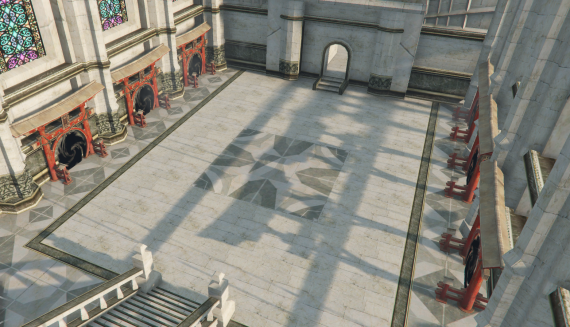
PREVIEW: https://streamable.com/v2rh9x
:flag_it: **Benvenuti al Mystical Portals!** ✨
Un'antica mappa sospesa nel cielo, avvolta nel mistero e ricca di segreti nascosti. Esplora isole fluttuanti, attraversa portali magici e scopri le meraviglie di questo mondo incantato. Perfetta per arricchire le scene di lore nei server survival e fantasy, offre un ambiente immersivo dove la magia e l’avventura si intrecciano. Sei pronto a svelare i misteri celati tra le nuvole?
:flag_gb: **Welcome to Mystical Portals!** ✨
An ancient sky map, shrouded in mystery and filled with hidden secrets. Explore floating islands, pass through magical portals, and uncover the wonders of this enchanted world. Perfect for enhancing lore scenes in survival and fantasy servers, it provides an immersive environment where magic and adventure intertwine. Are you ready to unveil the mysteries hidden among the clouds?
A fantastic fantasy map
Coords: 919.4626, 2761.0068, 606.6877, 6.0434 ( contact me to move it)
English Version
Prerequisites
- FiveM Client: Ensure you have the FiveM client installed and updated to the latest version.
- Map Files: Download Tempio del sole map files from the provided link or fivem assets.
Installation Steps
Download the Map Files
- Obtain the map files (usually in a .zip or .rar format) from the link provided by the creator.
- Obtain the map files (usually in a .zip or .rar format) from the link provided by the creator.
Extract the Files
- Extract the downloaded files using software like WinRAR or 7-Zip.
- Extract the downloaded files using software like WinRAR or 7-Zip.
Move the Map Files to the FiveM Server Directory
- Navigate to your FiveM server directory. This is typically located in your main server folder.
- Inside the server directory, locate or create a folder named
resources. - Move the extracted map folder into the
resourcesdirectory. The path should look like this:/resources/[your_map_folder].
Edit the Server Configuration
- Open the
server.cfgfile located in the main directory of your FiveM server. - Add a line to include the new map resource. It should look something like this:
start [your_map_folder] - Save and close the
server.cfgfile.
- Open the
Restart Your FiveM Server
- Restart your FiveM server to apply the changes.
Thank you!
- Restart your FiveM server to apply the changes.
Versione Italiana
Prerequisiti
- Client FiveM: Assicurati di avere il client FiveM installato e aggiornato all'ultima versione.
- File della Mappa: Scarica i file della mappa Tempio del Sole dal link fornito o dagli asset di FiveM.
Passaggi per l'Installazione
Scarica i File della Mappa
- Ottieni i file della mappa (di solito in formato .zip o .rar) dal link fornito dal creatore.
Estrai i File
- Estrai i file scaricati utilizzando software come WinRAR o 7-Zip.
Sposta i File della Mappa nella Directory del Server FiveM
- Vai alla directory del tuo server FiveM. Questa si trova tipicamente nella cartella principale del server.
- All'interno della directory del server, individua o crea una cartella denominata
resources. - Sposta la cartella della mappa estratta nella directory
resources. Il percorso dovrebbe essere simile a questo:/resources/[nome_cartella_mappa].
Modifica la Configurazione del Server
- Apri il file
server.cfgsituato nella directory principale del tuo server FiveM. - Aggiungi una riga per includere la nuova risorsa della mappa. Dovrebbe assomigliare a questo:
plaintextCopia codicestart [nome_cartella_mappa] - Salva e chiudi il file
server.cfg.
- Apri il file
Riavvia il Tuo Server FiveM
- Riavvia il tuo server FiveM per applicare le modifiche.
Grazie!